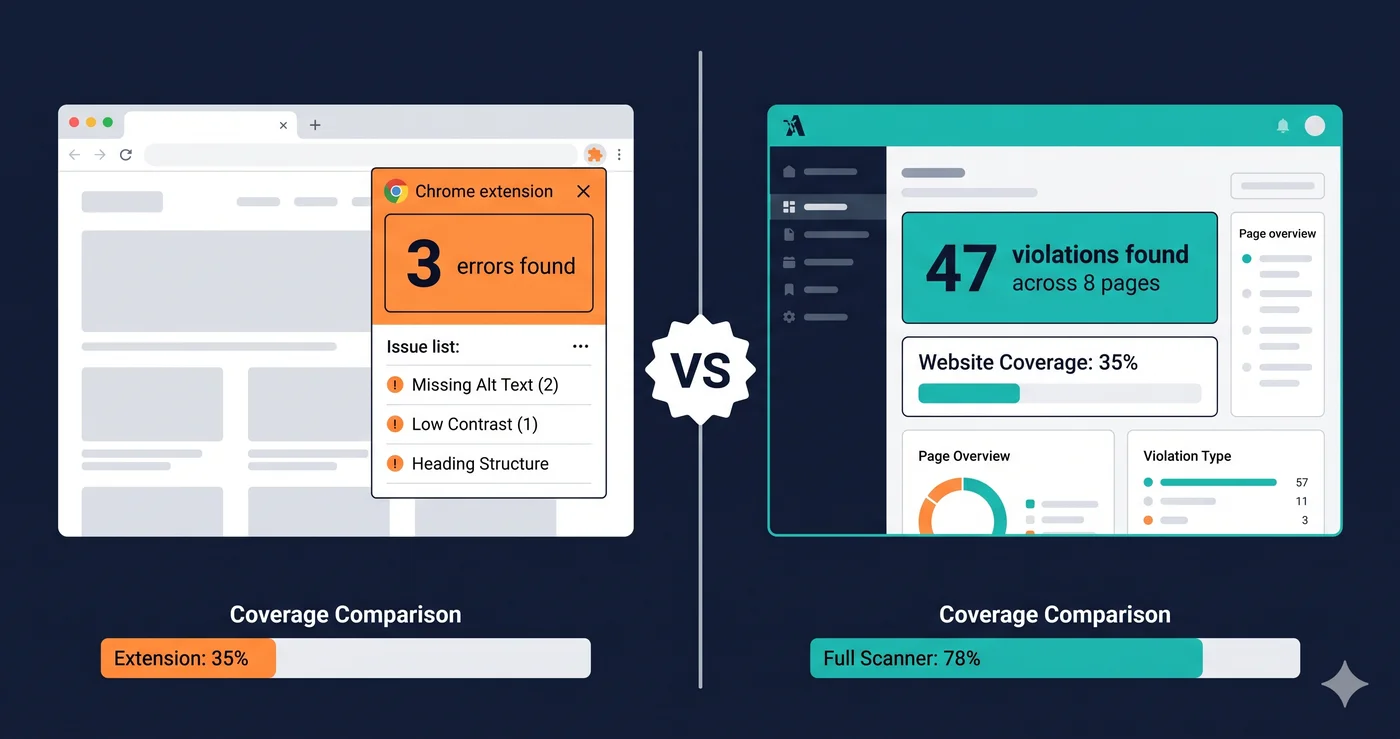
Attorneys scanning for ADA violations don't use browser extensions. They use automated crawlers that render JavaScript, open modal dialogs, and crawl every publicly accessible page on your domain — then document every barrier they find. The question isn't whether you have an ada compliance checker chrome extension installed. It's whether your testing covers the same ground that a plaintiff's scanner will.
Chrome extensions for accessibility testing are genuinely useful. They're free, install in seconds, and give developers instant feedback on the page in front of them. But according to the WebAIM Million 2026 report, 95.9% of the top one million websites still have detected WCAG failures — and the vast majority of those sites have had someone running WAVE or axe at some point. The extension didn't catch everything. It never does.
Here's what browser extensions do well, where they fall short, and what a full ada compliance checker finds that extensions will never see.
What ADA Compliance Checker Chrome Extensions Actually Do
Chrome extensions for accessibility testing inject a script into the currently rendered page and run automated checks against the live DOM — the same document your browser built after executing all JavaScript, loading third-party widgets, and applying CSS. This is a real advantage over purely static HTML analysis: the extension sees what the user sees, including dynamically generated content.
The most widely used options include:
WAVE (Web Accessibility Evaluation Tool) — Developed by WebAIM, WAVE overlays visual icons for errors, warnings, and structural elements directly on the page. Version 3.3.1.0 (released May 2026) aligns WAVE errors with WCAG 2.2 failures. It's the de facto free starting point for most development teams.
axe DevTools Extension — Deque's Chrome extension runs the axe-core engine against the rendered page. It has low false-positive rates and covers a solid subset of WCAG criteria automatically — its rule-based engine catches more than a static rule subset like Lighthouse or a structural checker like WAVE.
Accessibility Insights for Web — Microsoft's free extension offers automated axe-based scanning plus structured guided tests for keyboard navigation and focus order.
Silktide Accessibility Checker — Scans live or draft pages for 200+ accessibility issues and overlays findings directly on elements, including a fast contrast-checking mode.
Each of these integrates cleanly into a developer's workflow and costs nothing. For catching obvious violations during active development, they're the right tool.
The Coverage Ceiling: What Chrome Extensions Miss
Despite being useful, accessibility extension tools catch roughly 30–50% of accessibility issues, according to BrowserStack's analysis of DOM-based testing. That gap isn't random — it's structural.
Single-page scope. Extensions test the tab currently open in your browser. They don't crawl. They won't test your product detail pages, your checkout flow, your account dashboard, or your order confirmation page. An ADA demand letter is rarely about your homepage — it's about the specific page where a barrier blocked a real user.
No authenticated flows. Your cart, checkout, and member portal aren't publicly accessible. An extension running on a public URL won't reach behind login walls. Checkout flows are among the highest-risk pages for ADA violations precisely because they contain interactive form fields, dynamic price updates, and modal dialogs — and they're invisible to any browser extension running on a guest session.
No dynamic interaction testing. Extensions test a page at rest. They don't open your mobile menu, fire your cookie consent modal, trigger your live chat widget, or interact with your AJAX cart drawer. A keyboard trap inside a Klaviyo popup won't appear in a WAVE scan if WAVE runs before the popup has ever fired.
No cross-page pattern detection. Duplicate ID attributes, missing lang declarations, and skipped heading hierarchies often only become visible as a pattern across multiple pages. A single-tab extension cannot detect recurring violations that span your template system.
No compliance documentation. Browser extensions don't generate exportable reports, severity scores, or WCAG criterion references. When you need to demonstrate remediation effort — whether to a plaintiff's attorney or a compliance auditor — an extension screenshot won't serve as documentation.
| Capability | Chrome Extension | Full Scanner (ADAGuard) |
|---|---|---|
| Live DOM testing (post-JavaScript) | ✅ | ✅ |
| Full site crawl (multi-page) | ❌ | ✅ up to 100 pages |
| Authenticated page scanning | ❌ | ✅ |
| Dynamic interaction testing | ❌ | ✅ |
| Cross-page pattern detection | ❌ | ✅ |
| Compliance score and exportable report | ❌ | ✅ |
| WCAG 2.2 AA automated coverage | ~30–50% | ~78% |
| axe-core + 22 custom check categories | ❌ | ✅ |
| Section 508 + ADA coverage | Partial | ✅ All plans |
| WCAG AAA bonus checks | ❌ | ✅ All plans |
| Free entry point (no signup) | ✅ | ✅ |
Why the Coverage Gap Creates Real Legal Risk
Over 4,800 ADA website lawsuits were filed in 2025, a significant year-over-year increase (UsableNet). What's less discussed: a significant share of those defendants had already been sued before. They settled, made some fixes, and got sued again. Running a chrome extension as the only accessibility testing method is a credible explanation for that pattern — teams see the most visible errors, fix them, and remain blind to the violations buried deeper in their stack.
The elements that most commonly appear in demand letters are exactly the ones hidden from single-page analysis: keyboard traps in modal dialogs, missing ARIA labels on dynamically rendered content, unlabeled form fields inside checkout flows, and empty buttons in icon-only navigation bars. These are failures that surface only when a scanner interacts with the live, rendered application — not a static view of one page.
Plaintiff firms use automated crawlers. They scan entire sites. Testing with only a chrome extension when your adversary has a full DOM scanner is like proofreading your own emails while your counterpart has a full-site content audit.
What a Full ADA Compliance Checker Actually Covers
A full scanner like ADAGuard launches a headless browser, renders every page with JavaScript execution, and tests across 22 custom check categories plus axe-core integration — covering approximately 78% of WCAG 2.2 AA criteria automatically (43 of 55).
The coverage gap versus a browser extension includes:
- Images with missing, decorative, or misleading alt text across all page templates
- Form fields lacking programmatic labels — especially in dynamically rendered checkout components
- Color contrast failures on interactive states (hover, focus, active, visited)
- Keyboard focus trap detection in modals, overlays, and popups
- Empty links and buttons, including icon-only navigation elements
- Skipped heading levels across product and category page templates
- Language declaration errors on multilingual stores
- Missing landmark regions (`,
,
`)
- ARIA attribute misuse on dynamically updated regions
ADAGuard also includes WCAG AAA bonus checks — 2.5.5 (target size), 2.3.3 (animation), and 2.4.13 (focus appearance) — on every plan including the free tier. These are criteria that enterprise tools often lock behind five-figure annual contracts.
The Legitimate Role of Chrome Extensions
This isn't an argument for abandoning WAVE or axe. They have a clear, useful role: in-development spot-checking. When a developer is actively building a component, opening a browser extension on the in-progress page catches obvious violations before they ship to staging. Zero-friction, in-context, immediate — that's the ideal use.
The mistake is treating a browser extension as your accessibility compliance program. Extensions are a starting line. A practical testing workflow combines both:
- Developer uses axe or WAVE extension during build for immediate feedback
- Staging build gets a full crawler scan before deployment
- Production site runs scheduled automated scans to catch regressions from plugin updates, third-party script changes, or new content
The ada compliance checker chrome extension is the first step. The full scanner is what tells you whether the first step was enough.
The 30-Second Fix
Go to adaguard.io, paste your URL, and run a free website accessibility checker scan — no signup, no card required. Within 30 seconds you'll see what your extension-based testing is missing: the violations buried in product pages, checkout flows, modal dialogs, and template-level patterns. Your browser extension gave you a partial picture. Find out what the full scan reveals before a plaintiff's crawler does it for you.