Resolving aria-hidden Misuse on Interactive Elements
aria-hidden on buttons, links, and controls is one of the most dangerous WCAG failures — it makes entire UI sections invisible to screen readers while remaining mouse-clickable.
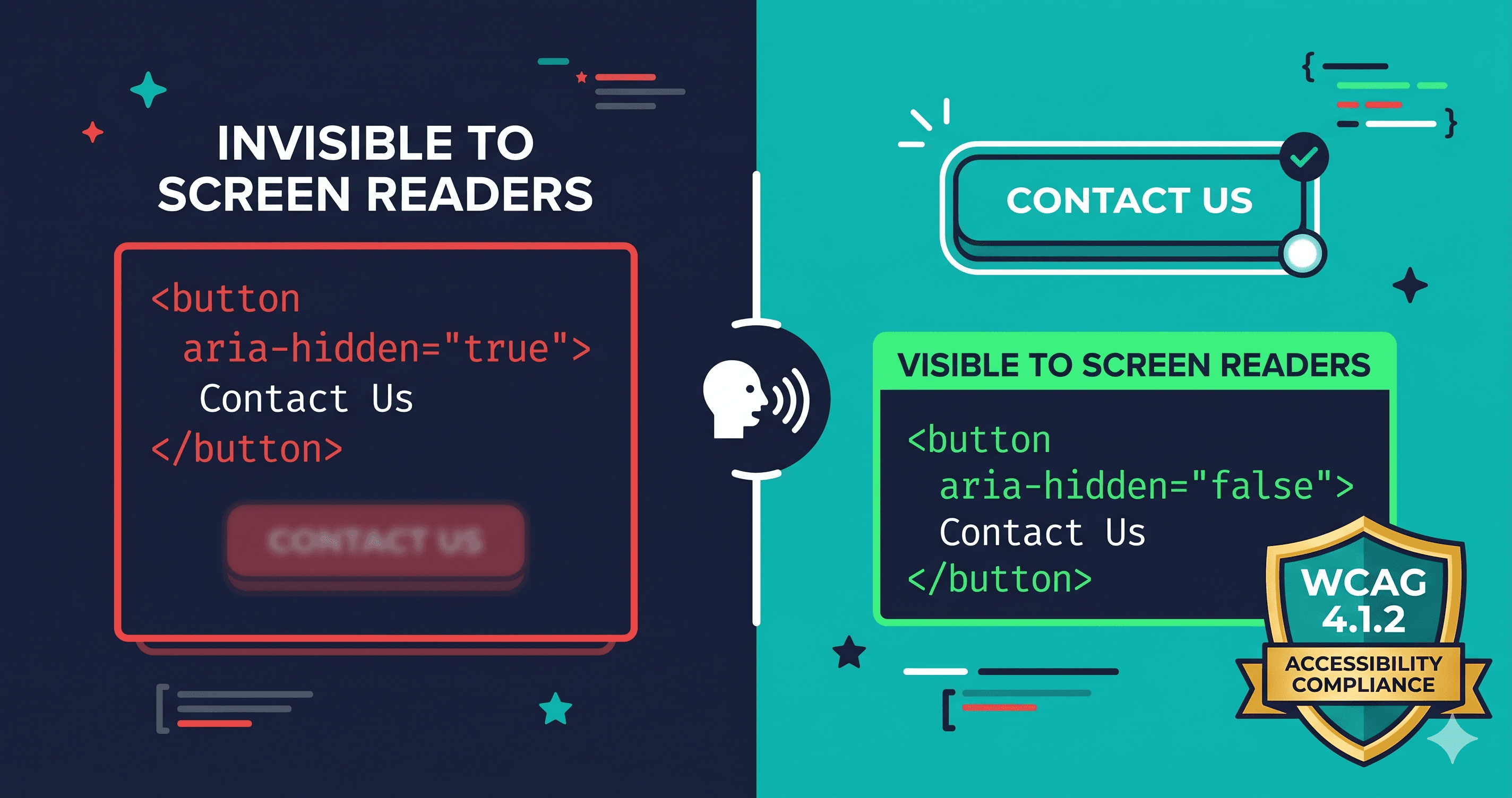
aria-hidden="true" silences an element from every screen reader on the planet. When that element is a button, a navigation link, or a form control — the element still works perfectly with a mouse and is completely invisible to assistive technologies. The user can hover over it, see it, click it. The screen reader user doesn't know it exists.
This is one of the most damaging WCAG failures a site can have, and it appears on 65.4% of tested homepages according to WebAIM's Million Homepage analysis — making ARIA misuse one of the most widespread accessibility failures on the web. In 2025, plaintiff attorneys filed over 4,800 ADA website lawsuits in U.S. federal courts (UsableNet), and demand letters increasingly cite specific ARIA violations with WCAG criterion numbers. aria-hidden on interactive elements directly violates WCAG 4.1.2 (Name, Role, Value, Level A) — the floor of accessibility compliance, not a nuanced edge case.
What aria-hidden Is Supposed to Do
aria-hidden="true" is a legitimate and useful attribute — when used correctly. Its purpose is to remove decorative, redundant, or non-meaningful content from the accessibility tree so screen readers don't waste user time on it.
Correct uses of aria-hidden="true":
Decorative icons that have a labeled parent button
Redundant visible text that duplicates an aria-label announcement
Visual dividers and spacers
Purely decorative SVG illustrations
Never use aria-hidden="true" on:
`` elements
<a> (anchor/link) elements
, , `` elements
Any element with tabindex="0" or tabindex="-1" that receives focus
Any parent element that contains focusable children
The rule is absolute: if a user can interact with it, it cannot be aria-hidden.
How the Violation Happens in Real Projects
aria-hidden misuse on interactive elements almost always happens one of three ways:
Cause
Typical Scenario
Icon-inside-button pattern
Dev adds aria-hidden to the icon, accidentally applies it to the button wrapper instead
Copy-paste from component library
A modal or drawer template uses aria-hidden on a close button incorrectly
JavaScript toggle errors
A script sets aria-hidden="true" on a modal container, but the close button is inside that container
Theme/plugin injection
Third-party widget injects a chat button or cookie banner with aria-hidden already set
CSS-driven visibility
A developer confuses aria-hidden with display:none for hide/show toggle logic
The most common real-world pattern is the modal/drawer container problem: a developer correctly sets aria-hidden="true" on the page's main content when a modal is open (to prevent screen readers from browsing the background), but forgets to remove it when the modal closes — or applies it to the wrong container, accidentally trapping the modal's own close button inside the hidden region.
The WCAG Criteria Violated
Criterion
Level
Failure
4.1.2 Name, Role, Value
A
Interactive element removed from accessibility tree — has no perceivable role or name for AT
1.3.1 Info and Relationships
A
UI structure and relationships not programmatically determinable
2.1.1 Keyboard
A
If the hidden element is keyboard focusable, it creates a ghost focus trap
A single misplaced aria-hidden can fail multiple Level A criteria simultaneously. Level A is the minimum threshold — any failure here disqualifies an entire audit.
The Ghost Focus Problem
When aria-hidden="true" is applied to a focusable element, keyboard users can still Tab to that element. They'll hear nothing — the screen reader skips the announcement because the element is hidden from the accessibility tree. But focus is still there, visually invisible if the focus ring is also suppressed.
This creates what accessibility auditors call a "ghost focus" — keyboard focus on an element that doesn't exist for the screen reader. The user is trapped at a point in the page with no feedback, no way to know what's selected, no way to activate it by keyboard, and no indication of how to escape. This is a keyboard trap violation under WCAG 2.1.2 in addition to the 4.1.2 failure.
The Correct Pattern for Icon Buttons
The most common legitimate use of aria-hidden near interactive elements is on decorative icons inside labeled buttons. The correct pattern:
[ HTML ]
<!-- Correct: aria-hidden on the icon only, button has accessible name -->
<button aria-label="Close dialog">
  <svg aria-hidden="true" focusable="false">...</svg>
</button>
Note focusable="false" on the SVG — this prevents Internet Explorer and older browsers from making the SVG itself Tab-focusable. Both attributes belong on the , never on the .
What to Do When You Find Violations
When a WCAG checker flags aria-hidden on interactive elements, the resolution path depends on where the violation lives:
In your own code:
Remove aria-hidden="true" from the element, or move it to a non-interactive child (like a decorative icon). Hand your developer the specific element from the scan report and the WCAG criterion: 4.1.2. If the element is a modal container, review the JavaScript toggle logic — the script should only apply aria-hidden to background content, not to the modal itself or its focusable children.
In a third-party widget or plugin:
Chat widgets, cookie consent banners, and accessibility overlay tools are common sources of this violation — ironically, accessibility overlay tools have been documented injecting their own buttons with incorrect ARIA attributes. Open a support ticket with the vendor referencing WCAG 4.1.2 and share the specific HTML element from your scan report. In January 2025, the FTC reached a $1 million consent order with an overlay vendor over deceptive accessibility claims — vendor accountability for WCAG correctness is no longer optional.
In a theme or page builder:
Check the theme's most recent release notes for accessibility fixes. If the violation is in an unmodified theme component, file a bug report with the theme vendor citing WCAG 4.1.2.
Finding aria-hidden Misuse at Scale
Manually searching for aria-hidden misuse requires reviewing every template, every component, and every JavaScript toggle across your codebase — and then testing the live DOM state for each interactive scenario. Static HTML analysis will find aria-hidden in the markup, but won't catch violations introduced by JavaScript at runtime (the most common source).
ADAGuard renders JavaScript before scanning, catching aria-hidden violations in their live-DOM state — including violations introduced by third-party widgets, modal toggles, and JavaScript-driven UI patterns. The scan report identifies each affected element with its HTML selector, making remediation targeting precise rather than a full codebase search.
The 30-Second Fix
Scan your site for aria-hidden misuse before a demand letter identifies it for you. ADAGuard checks all 23 WCAG violation categories — including ARIA attribute misuse across interactive elements — in a single scan. Paste your URL at adaguard.io, free and no signup required, and see exactly which elements are silenced for screen reader users on your live site.</a>