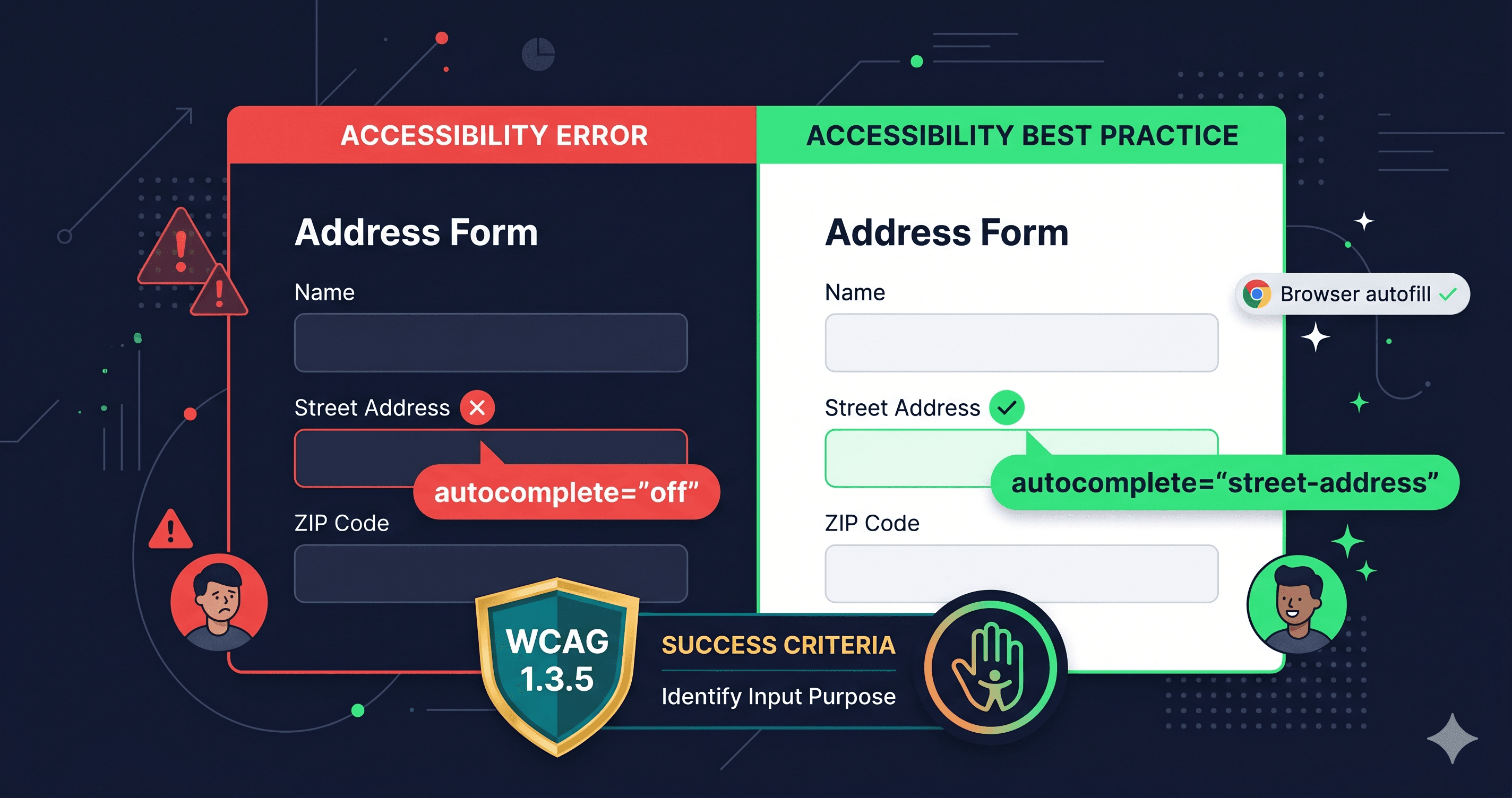
Missing or incorrect autocomplete attributes on address forms violate WCAG 1.3.5 and create barriers for motor-impaired users. Here's what the violation looks like and how to find it.
Filling out a shipping address is a two-minute task for most users. For someone with a motor disability, Parkinson's disease, or severe arthritis, it can take 20 minutes — or be impossible without browser autofill. WCAG Success Criterion 1.3.5 (Identify Input Purpose, Level AA) exists specifically to prevent that barrier. It requires that form fields collecting personal user information include the HTML autocomplete attribute with a valid, standardized value so browsers and assistive technologies can offer autofill assistance.
The violation is more common than most developers realize. WCAG 1.3.5 is a Level AA requirement, which means it's the de facto standard courts apply under ADA Title III for private businesses, a formal requirement under Section 508 for federal contractors, and mandatory under the European Accessibility Act (enforceable since June 28, 2025) for any company selling to EU consumers. A missing autocomplete attribute on a checkout address form isn't just a minor omission — it's a documented WCAG failure that appears in accessibility audit reports and, increasingly, in demand letters.
What WCAG 1.3.5 Actually Requires
WCAG 1.3.5 applies to any input field that collects information about the user themselves — not just any form field. A search box doesn't need an autocomplete attribute. A "recipient name" field on a shipping form does.
The criterion requires the autocomplete attribute to use a value from the standardized list defined in the HTML spec. There are 53 valid autocomplete token values. The most common for address forms:
Field Type
Required autocomplete Value
Full name
name
First name
given-name
Last name
family-name
Email address
email
Phone number
tel
Street address (single field)
street-address
Address line 1
address-line1
Address line 2
address-line2
City
address-level2
State / Province
address-level1
ZIP / Postal code
postal-code
Country
country or country-name
Credit card number
cc-number
Card expiry
cc-exp
Card CVV
cc-csc
The most common failure is simply not including the attribute at all. The second most common failure is using unofficial values — like autocomplete="zipcode" instead of autocomplete="postal-code", or autocomplete="state" instead of autocomplete="address-level1". These unofficial values fail silently: browsers may or may not autofill them, and screen reader users get no benefit from the intended behavior.
The Billing vs. Shipping Distinction
E-commerce sites with both billing and shipping address forms must differentiate between them. If two fields on the same page both have autocomplete="given-name", the browser can't determine which is the shipping first name and which is the billing first name.
This is an illustrative pattern — a correct implementation wraps each group in a <section> or fieldset with appropriate context. The key point: without the prefix, users who have different billing and shipping addresses will have incorrect autofill behavior, even if the autocomplete attribute is technically present.
Common Violations and Their WCAG Impact
Violation
WCAG Failure
autocomplete attribute missing entirely
1.3.5 Level AA
Invalid autocomplete value (e.g. "zipcode")
F107 (Failure of 1.3.5)
Correct value but wrong field (e.g. "email" on a phone field)
F107 (Failure of 1.3.5)
No prefix on duplicate field types
1.3.5 (ambiguous purpose)
autocomplete="off" on personal data fields
1.3.5 (intentional block of user assistance)
The last violation — autocomplete="off" on address or payment fields — is particularly common in security-focused checkout implementations. Some developers disable autocomplete to prevent browsers from pre-filling sensitive fields. WCAG does not consider this acceptable for fields collecting personal information. The WCAG failure is documented as F107 in the W3C failure techniques.
What to Do When Your WCAG Checker Flags These Errors
When ADAGuard or another WCAG checker identifies autocomplete failures, the path to resolution is straightforward:
For your own checkout/form code:
Find each flagged input element and add or correct the autocomplete attribute value from the standardized list above. Your developer will need to know: the specific field name, the current autocomplete value (if any), and the correct replacement value. The scan report provides all of this.
For third-party checkout forms (Shopify Checkout, Stripe, PayPal):
If your checkout is handled by a platform — Shopify's native checkout, Stripe Checkout, PayPal's hosted payment pages — the autocomplete attributes live inside the platform's own code. Open a support ticket referencing WCAG 1.3.5 and the specific field that's failing. Most major payment platforms are actively improving their accessibility posture due to EAA enforcement pressure.
For custom theme address components:
Theme vendors and page builder plugins frequently ship address forms without correct autocomplete values. Check your theme's changelog for accessibility updates, and file a bug report with the WCAG criterion number if the values are incorrect or missing.
How Automated Testing Catches These Errors
WCAG 1.3.5 is well-suited to automated testing because the violation is structural — it's present or absent in the HTML. A scanner that renders JavaScript can check every input field, compare the autocomplete value against the standardized list, flag missing attributes, and identify invalid values. This is exactly the kind of coverage where automated WCAG checkers deliver reliable results without manual effort.
The nuance that requires human judgment: determining whether a field collects personal user information in the first place. A "coupon code" field doesn't need autocomplete. A "gift recipient name" field does. Automated tools use field label and type attribute context to make this determination — but reviewing the flagged results against your specific form logic takes a few minutes and is worth doing.
The 30-Second Fix
Most checkout teams don't audit their autocomplete attributes until a lawsuit or audit forces the issue. By then, the WCAG 1.3.5 failure is already in the complaint.
ADAGuard scans every form field on your checkout and address pages, identifies missing and invalid autocomplete values, and gives you the specific element and current attribute value alongside the correct replacement. Paste your checkout URL at adaguard.io — free, no signup — and have the full report in under 30 seconds.</section>