Duplicate ID attributes break ARIA labels, skip links, and form associations — silently. Here's how to find and fix them in complex, component-heavy storefronts.
Duplicate ID attributes don't throw a JavaScript error. They don't break your layout. They don't cause a 500 response. They just silently destroy the accessibility of your form labels, your ARIA relationships, and your skip navigation — for every user who relies on assistive technology to interact with your site.
They are also one of the most common automated violations reported by tools like axe-core. According to Deque's research, duplicate IDs appear in the top ten most frequently flagged issues across major websites. In complex storefronts built on Shopify, WooCommerce, or component-based React applications — where multiple third-party widgets, theme sections, and dynamic components all render into the same DOM — ID collisions happen constantly, invisibly, and with real user impact.
What Duplicate IDs Actually Break
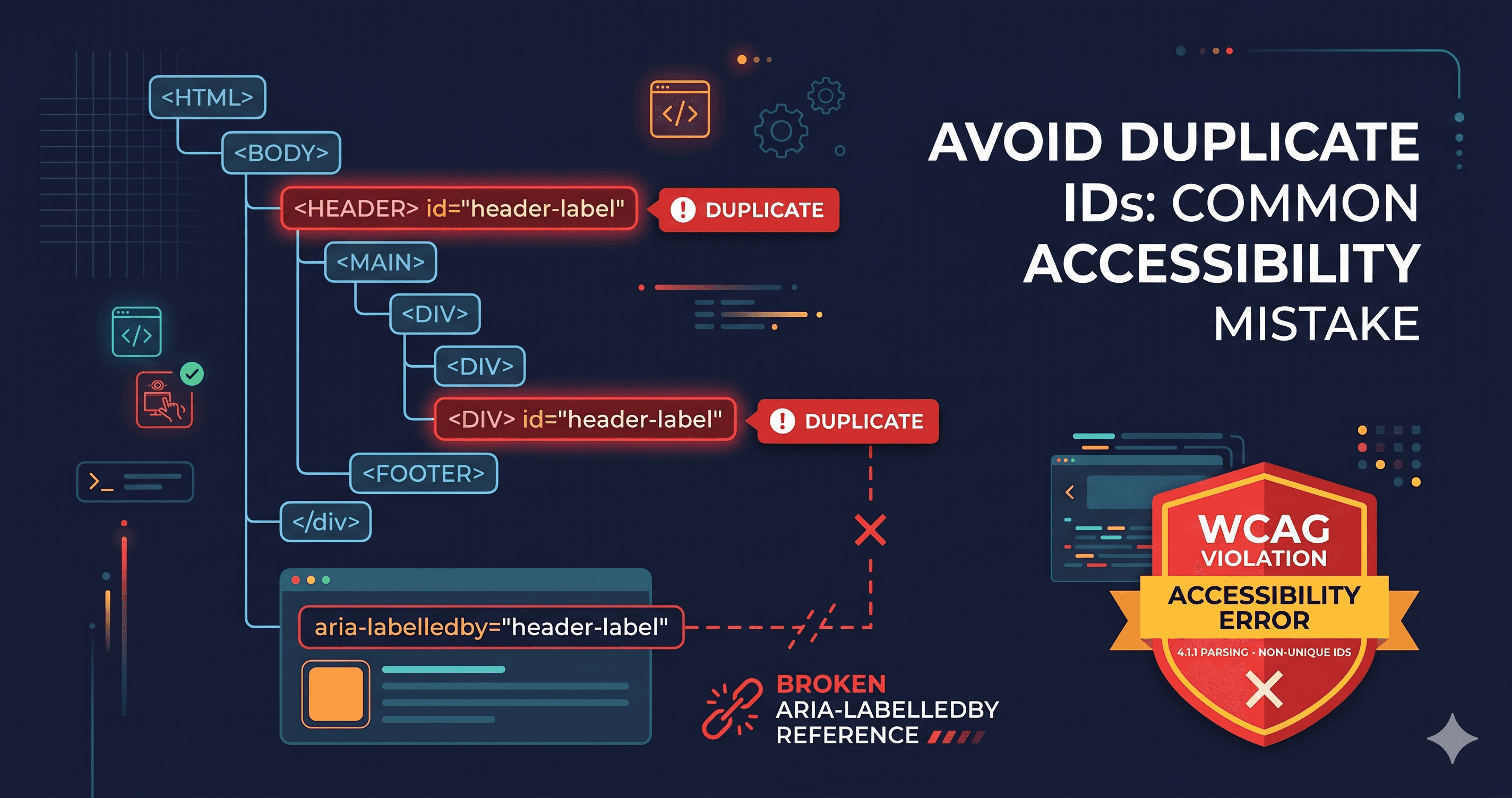
HTML requires that ID attribute values be unique within a document. When the same ID appears twice, the browser's behavior becomes unpredictable — and assistive technologies are hit hardest. The specific breakage depends on how the duplicate ID is used.
Use Case
What Breaks When ID Is Duplicated
+
Screen readers associate the label with the first matching element only. The second input gets no announced label.
aria-labelledby="heading-1"
Screen reader reads the first element with that ID, ignoring the intended one. Announcements become wrong or missing.
aria-describedby="error-msg"
Error messages fail to be announced for the correct input. Form errors go unheard.
Skip link <a href="#main-content">
The skip link jumps to the first matching element — which may not be the main content. Keyboard users land in the wrong place.
aria-controls="dropdown-menu"
The expand/collapse ARIA button references the wrong element. Menu state announcements break.
The most damaging scenario: a checkout form where id="email", id="phone", and id="address" each appear twice — once from the theme's form template and once injected by a payment widget or marketing pop-up. Every field label is now broken for screen reader users. They cannot tell which input they are in.
Why This Happens in Modern Storefronts
Single-page applications, drag-and-drop page builders, and third-party widget stacks all generate their own HTML fragments. When those fragments share a codebase with your theme — but were not designed to co-exist — ID collisions are the natural result.
Common sources of duplicate IDs in Shopify, WooCommerce, and headless storefronts:
Page builder sections (PageFly, Shogun, GemPages) rendering multiple instances of the same component on one page — each with the same hardcoded ID
Pop-up or modal widgets (Klaviyo, Attentive, Privy) injecting form fields with generic IDs like id="email" or id="name" that collide with your main form
Product card grids where each card renders an "Add to Cart" button with id="add-to-cart" — one per product, all identical
React/Next.js components where a reusable component generates a static ID rather than a unique one per instance
The problem compounds with every third-party widget you add. Each vendor builds in isolation; none of them know what IDs your theme already uses.
The WCAG Criterion (and the 2.2 Update)
Duplicate IDs historically triggered a failure under WCAG 4.1.1 Parsing (Level A), which required well-formed markup. In WCAG 2.2, the 4.1.1 criterion was deprecated — it was removed as a standalone requirement because modern browsers handle malformed markup gracefully.
However, the underlying accessibility impact of duplicate IDs did not disappear. Duplicate IDs that break ARIA relationships now trigger failures under the specific criteria they affect:
WCAG 1.3.1 Info and Relationships (AA) — when aria-labelledby or aria-describedby references fail
WCAG 2.4.1 Bypass Blocks (A) — when skip links target the wrong anchor
WCAG 4.1.2 Name, Role, Value (AA) — when ARIA controls point to the wrong element
The failure mode matters: you cannot point to a duplicate ID as a harmless HTML quirk. If that ID is used in an ARIA reference or a skip link, you have an active violation under the relevant criterion.
How Duplicate IDs Compound with Third-Party Scripts
The collision problem gets significantly worse when you factor in the lifecycle of a modern storefront. You launch with a clean theme. Then you add a live chat widget. Then a loyalty program. Then an email capture pop-up. Then a product review app. Each of these vendors injects their own HTML fragment into your DOM — often with generic ID values like id="modal", id="close-btn", or id="email-input".
None of these vendors tested their widget against your theme. None of them know what IDs your checkout form uses. The collision is discovered by your users — specifically, by the ones who rely on ARIA relationships to understand your page structure.
The scope of this problem in the wild is significant. According to Deque's research team, duplicate ID violations appear in the majority of enterprise-scale web audits they conduct. On pages built with multiple third-party widgets, finding 10-20 duplicate ID pairs in a single DOM is not unusual.
What makes this particularly hard to catch manually: the duplicate ID may only appear on certain pages, only after a user has scrolled (triggering lazy-load), or only when a specific widget is active (such as after a user has added to cart and the pop-up fires). A manual code review of your theme files will not catch these — they require live DOM inspection with all scripts running.
Why axe-core Alone Misses Many Duplicate ID Issues
The relationship between duplicate IDs and WCAG 2.2 has a nuance worth understanding. In WCAG 2.1, criterion 4.1.1 (Parsing) explicitly covered duplicate IDs. In WCAG 2.2, that criterion was deprecated.
This means axe-core's duplicate-id rule — which was mapped to 4.1.1 — is technically flagged as obsolete in WCAG 2.2 contexts. Tools that only report active 2.2 violations will suppress it.
However, the actual harm from duplicate IDs did not disappear with the criterion change. The violations they cause — broken aria-labelledby, broken aria-controls, broken skip links — are still active failures under 1.3.1, 4.1.2, and 2.4.1. A comprehensive scanner needs to detect duplicate IDs not just as a structural flag but by tracing their ARIA relationships and reporting which downstream criteria they violate.
ADAGuard's 22 custom checker modules include ARIA relationship validation that traces these connections in the live DOM — catching both the duplicate ID itself and the specific WCAG criterion it breaks, so your developer knows exactly what to fix.
Finding Duplicate IDs at Scale
For a complex storefront, manual inspection is not realistic. The right approach is automated scanning on the live rendered DOM — after all scripts have run and dynamic components have loaded.
Running ADAGuard on your storefront will surface every duplicate ID that exists in the fully-rendered page, including those injected by third-party scripts. The report shows which elements are duplicated, where they appear, and which ARIA relationships are broken as a result. Because ADAGuard renders your page with JavaScript running — including all widget injections — it catches the collisions that a static HTML checker would never see.
What to Do When You Find Them
The fix principle: Every id attribute in a page must be unique. There are no exceptions.
For dynamic components and repeated templates, the right fix is to generate IDs programmatically:
[ HTML ]
<!-- Instead of a hardcoded ID repeated per card: -->
<button id="add-to-cart">Add to Cart</button>

<!-- Use a product-specific unique ID: -->
<button id="add-to-cart-{{ product.id }}">Add to Cart</button>
This illustrative pattern (the exact syntax varies by templating language) ensures each rendered button gets a unique ID based on the product's unique identifier.
Violations your platform settings may fix: Some platforms provide unique ID generation automatically in newer theme versions. Check whether your theme has pending updates before escalating to a developer.
Violations that require a developer ticket: If your page builder, widget, or custom theme is generating hardcoded IDs, you need a code-level fix. When escalating, give your developer the exact duplicate ID value and the WCAG criterion:
WCAG 1.3.1 (broken label/ARIA association)
WCAG 4.1.2 (ARIA control reference pointing to wrong element)
WCAG 2.4.1 (skip link landing on wrong element)
Verifying the Fix
After a developer has resolved duplicate IDs in your storefront, verification requires testing the live page — not just reviewing the code change. The fix in the template may be correct, but if a third-party widget is still injecting a conflicting ID, the collision persists in the rendered DOM regardless of your code change.
Run a new ADAGuard scan after the fix. The report will confirm whether any duplicate IDs remain in the rendered page, and whether the ARIA relationships that were previously broken are now resolving correctly. For checkout flows, run the scan both on the unauthenticated product page and on the cart/checkout page — some widget injections only fire after cart interactions.
This verification step matters because duplicate ID collisions can be intermittent: they appear when a specific combination of widgets is active on a page and disappear on simpler pages. A scan of your homepage alone is not sufficient. Your checkout flow, your product detail pages, and any page that renders a pop-up or slide-in widget should all be scanned independently.
The 30-Second Fix
Duplicate IDs are invisible in your browser and invisible to your customers — until a screen reader user tries to fill out your checkout form and hears the wrong label on every field. That's not a theoretical user. 7.6 million Americans use screen readers, and they're buying things online.
Run a free scan at adaguard.io. ADAGuard's live DOM scanning surfaces every duplicate ID collision in your rendered storefront, including the ones injected by your third-party widgets after page load. Your developer needs a list, not a theory — the report gives them exactly that.
Verifying the Fix
After a developer resolves duplicate IDs in your storefront, verification requires testing the live rendered page — not just reviewing the code change. A fix in the template may be correct while a third-party widget continues injecting a conflicting ID, leaving the collision intact in the rendered DOM.
Run a new ADAGuard scan after the fix. The report confirms whether any duplicate IDs remain in the rendered page, and whether the ARIA relationships that were previously broken are now resolving correctly. For checkout flows, run scans on both the unauthenticated product page and the cart/checkout page — some widget injections only fire after cart interaction events.
This matters because duplicate ID collisions are often intermittent: they appear when a specific widget combination is active and disappear on simpler pages. Scanning your homepage alone is not sufficient. Your checkout flow, product detail pages, and any page that renders a pop-up or slide-in widget should each be scanned independently. ADAGuard's scan shows the live rendered DOM state at the time of the scan, giving you an accurate picture of what users — and law firms — actually encounter.</a>