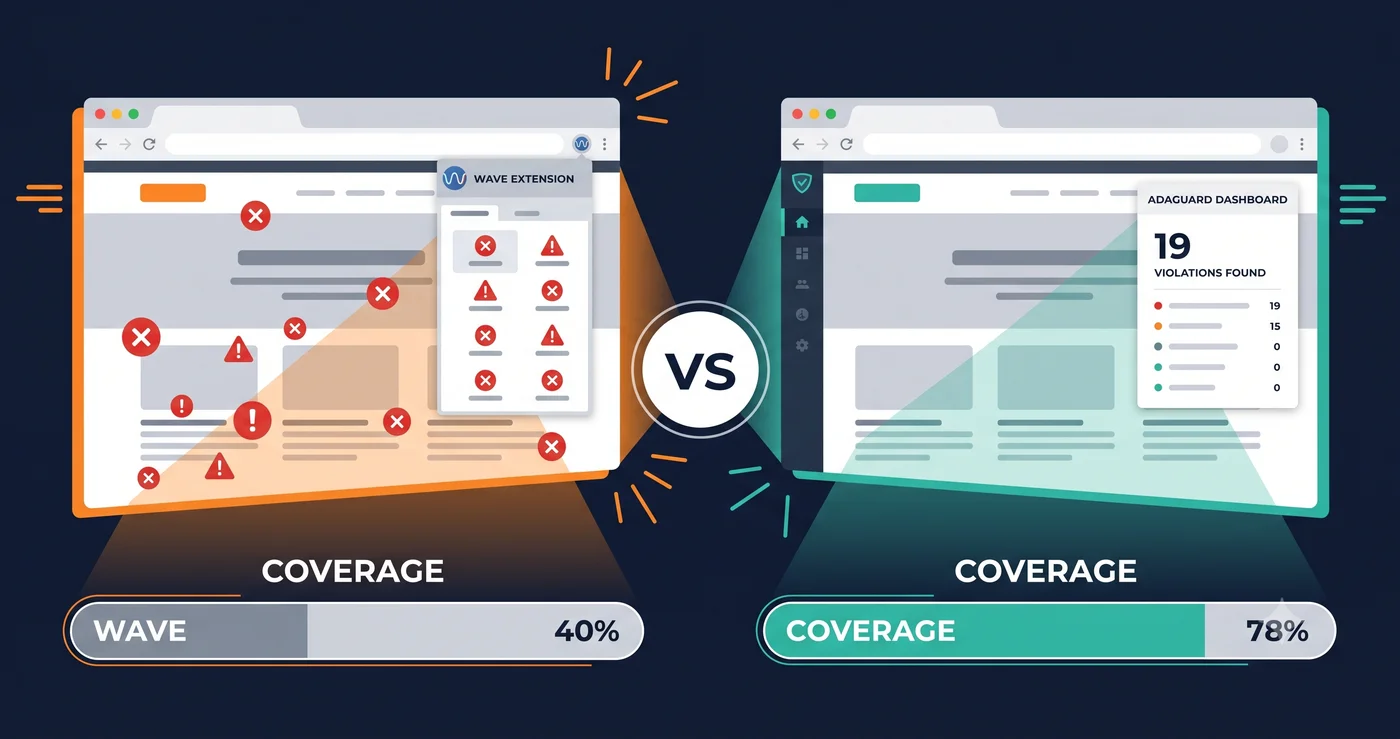
The wave ada compliance checker is one of the most-used accessibility tools in the world. It's free, it's browser-based, developed by WebAIM, and it's been helping developers find accessibility issues since 2001. If you're using it as your primary accessibility testing tool in 2026, you're catching approximately 40% of the violations on your site.
The other 60% — the keyboard traps in your cart drawer, the inaccessible modal close buttons, the ARIA misuse in your JavaScript-rendered components — remain invisible to WAVE. Those are the violations that generate ADA demand letters.
What WAVE Is and How It Works
WAVE is a free web accessibility evaluation tool built by WebAIM at Utah State University. The browser extension (available for Chrome, Firefox, and Edge) overlays accessibility icons directly on your page, visually flagging errors, alerts, structural elements, and contrast failures.
It's genuinely useful for developers learning accessibility, for quick visual reviews of static pages, and for catching obvious failures like missing form labels and empty buttons. It's not the right primary tool for an ADA compliance program — and understanding exactly why is important for anyone who has been relying on it.
What the WAVE ADA Compliance Checker Misses
WAVE's limitations are structural, not incidental:
JavaScript-rendered content. Modern eCommerce sites built on Shopify, BigCommerce, WooCommerce, Next.js, and React render significant content through JavaScript — cart drawers, modal popups, product configurators, dynamic filters, and live chat widgets. WAVE's server version may not fully apply JavaScript when evaluating pages. The browser extension handles this better, but interactive states that only appear after user actions — an open modal, a triggered dropdown, an AJAX-loaded cart — require manual interaction during each scan. An automated website accessibility checker that scans the fully rendered live DOM catches these without manual intervention.
Authenticated pages. WAVE cannot log in. Every page behind a login screen — account dashboards, checkout flows, subscription portals, patient health records, banking interfaces — is completely outside what the wave ada compliance checker can test. For eCommerce and healthcare sites, the highest-risk pages for ADA exposure are exactly these authenticated flows. Testing only public-facing pages produces a compliance picture that is dangerously incomplete.
ARIA interaction states. ARIA misuse that only manifests after interaction — a modal that fails to trap focus, a button that broadcasts an incorrect role when toggled, a live region that announces updates incorrectly — requires the element to be in an active state during testing. WAVE scans the page as loaded, not the page as interacted with.
Whole-site scanning. WAVE evaluates one page at a time. There is no crawl mode, no bulk scanning, no site-wide report. For a site with 500 pages, WAVE requires 500 manual scans. An automated ada compliance checker runs the full site and surfaces patterns across pages — which is how you find systemic violations like missing form labels across every checkout step, not just one of them.
Feature Comparison: WAVE vs ADAGuard
| Feature | WAVE | ADAGuard |
|---|---|---|
| WCAG 2.2 AA automated coverage | ~40% | ~78% |
| JavaScript / live DOM scanning | Limited (extension better than server) | ✅ Full live DOM rendering |
| Authenticated page scanning | ❌ | ✅ Included |
| Whole-site crawl scanning | ❌ | ✅ |
| Free tier | ✅ Browser extension | ✅ No signup required |
| Axe-core integration | ❌ | ✅ Plus 22 custom checkers |
| ADA Title III coverage | ✅ Partial | ✅ Full |
| Section 508 coverage | ✅ Partial | ✅ Full |
| WCAG criterion-mapped reports | ✅ | ✅ |
| Color contrast checker | ✅ | ✅ |
| WCAG AAA bonus checks | ❌ | ✅ (2.5.5, 2.3.3, 2.4.13) |
| Exportable compliance report | ❌ | ✅ |
| Annual cost | Free | Free tier available; $1,290/yr Professional |
Where WAVE Is Still Useful
This isn't an argument that WAVE should be deleted from your toolkit. It's an argument that WAVE should not be your only tool.
Learning and education. WAVE's visual overlay makes it excellent for developers who are learning to identify accessibility issues. The icon system is intuitive, and the ability to see exactly where on the page an error lives is valuable for remediation training.
Quick checks on static pages. For simple, content-heavy pages with minimal JavaScript — a blog post, a static informational page, a document-style page — WAVE's coverage is sufficient for a first-pass review.
In-browser interaction testing. A developer using the WAVE extension can manually trigger interactive states (open a modal, activate a dropdown, submit a form with errors) and then run WAVE to see what it detects in that state. This manual workflow closes some gaps, though it's slow and doesn't scale.
Where WAVE consistently fails is as a compliance tool for modern dynamic websites. The violations that appear in ADA demand letters — unlabeled button in a JavaScript cart drawer, keyboard trap in a cookie consent modal, inaccessible form in a checkout popup — require a free ada compliance checker that tests the live DOM, not a static HTML scan.
Why Coverage Gap Matters for ADA Exposure
ADA demand letters and attorney scanning programs don't use WAVE. They use automated scripts that scan the live rendered DOM, identify specific WCAG criterion failures, and screen for the six violation categories that the WebAIM Million 2026 report confirmed appear on 83.9% to 13.5% of all websites: low contrast, missing alt text, missing form labels, empty links, empty buttons, and missing document language.
If your compliance program uses the wave ada compliance checker exclusively, you're testing against roughly 40% of what plaintiff attorneys are testing against. The remaining 60% of failures — including those in authenticated flows that WAVE cannot reach at all — are your legal exposure.
A note on the free tier: ADAGuard is also free to start. Paste any URL at adaguard.io — no account, no install — and get a full live DOM scan in 30 seconds. The same free tier that WAVE provides, but against the live rendered page, covering 23 scanner modules and approximately 78% of WCAG 2.2 AA criteria.
What to Do When You Find Violations
Running a website accessibility checker that catches violations is the first step. Acting on the findings is what matters for compliance and legal protection.
When ADAGuard surfaces a violation, it maps every issue to the specific WCAG criterion — 1.1.1 for missing alt text, 1.4.3 for contrast failures, 2.1.1 for keyboard access gaps, 4.1.2 for unlabeled interactive elements. Those criterion numbers fall into two action paths:
Platform-addressable fixes: Issues your CMS, theme, or third-party vendor can resolve through settings — enabling semantic heading output, configuring required-field indicators, adjusting a theme color token to meet 4.5:1 contrast. Bring the criterion number to vendor support; it's the language they understand.
Code fixes: Issues requiring development changes. Hand the criterion number directly to your developer. They don't need a description of the symptom — the criterion tells them exactly what the code needs to do. An ada compliance check report with criterion-mapped violations is a development ticket in itself.
The wave ada compliance checker produces icon overlays. ADAGuard produces criterion-mapped reports. One tells you something is wrong on the page. The other tells you exactly which WCAG requirement is failing — and that specificity is what your developer and your legal defense need.
The 30-Second Fix
Close the coverage gap right now. Paste your URL into ADAGuard — free, no signup, no extension required — and see what your ada compliance checker missed. The scan takes 30 seconds and tests the live DOM, including JavaScript-rendered content. Compare it against your last WAVE output. The delta between those two reports is the part of your site that's invisible to your current testing program — and visible to everyone else.