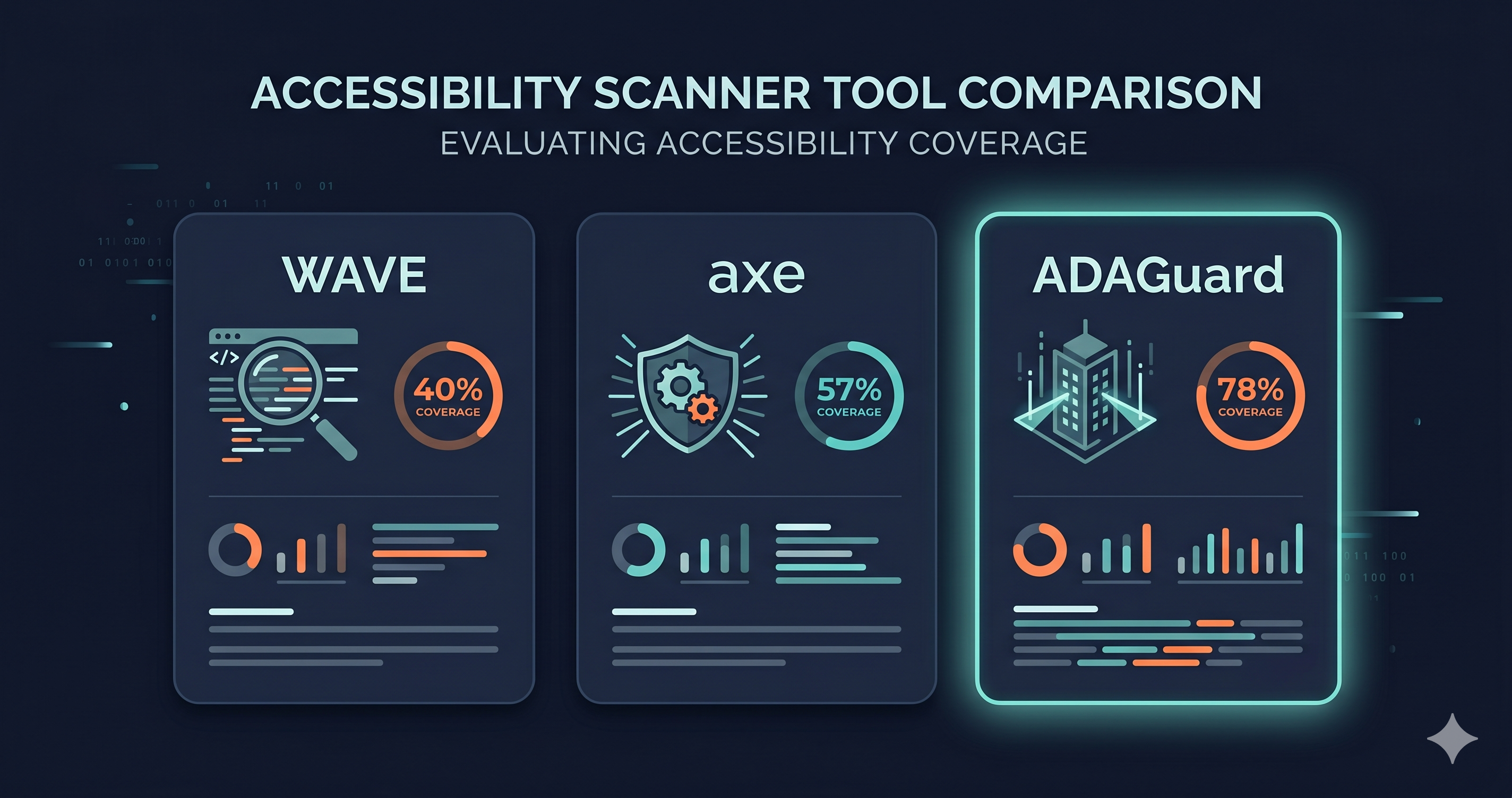
Run WAVE, axe-core, and ADAGuard on the same URL. You will get three different results. Not because two of them are wrong — but because all three are measuring different things, with different architectures, against a site that exists in multiple states simultaneously.
The website accessibility checker category contains more variation than most users realize. Understanding why these tools differ isn't a technical curiosity — it's the difference between a scan that matches your real legal exposure and a scan that gives you false confidence before an ADA demand letter arrives.
In 2025, 4,800+ ADA website lawsuits were filed (UsableNet 2025 mid-year report) — a significant year-over-year increase. Most targeted e-commerce sites with accessibility violations that automated scans had not flagged.
WAVE: Visual, Free, and Built for Non-Developers
WAVE (Web Accessibility Evaluation Tool), developed by WebAIM, is the most widely used free wcag checker for non-technical users. It runs as a browser extension or via the WAVE website, overlaying your live page with visual indicators: red icons for errors, yellow icons for alerts, green icons for structural elements. The visual output makes it uniquely accessible to content editors, marketing teams, and designers who need to understand accessibility without reading technical reports.
WAVE evaluates the page in your current browser session, which means it does see your JavaScript-rendered content — an advantage over pure source-code scanners. Its limitation is rule depth: WAVE's rule set covers a limited subset of WCAG 2.2 AA criteria, with particular strength in structural issues like missing alt text, form label associations, and heading hierarchy.
What WAVE typically misses: keyboard trap failures in dynamic modals, ARIA misuse in complex component libraries, contrast failures in interactive states, WCAG 2.2-specific criteria, and violations inside authenticated flows. WAVE also has no API for CI/CD integration and no authenticated scanning — it operates on publicly accessible, unauthenticated page states.
Best use case: Quick visual feedback for content teams; spot-checking specific pages; introductory accessibility education.
axe-core: The Developer Standard, Zero False Positives
axe-core is the open-source accessibility rule engine maintained by Deque Systems. It powers Lighthouse, many CI/CD integrations, and is available as a standalone browser extension (axe DevTools). Its defining characteristic is zero false positives — axe reports only violations it can confirm with certainty, avoiding the noise that makes some tools difficult to integrate into developer workflows.
axe-core's automated coverage, measured by issue volume per Deque's own published research, is the highest among free, open-source tools. It integrates natively with virtually every testing framework: Jest, Playwright, Cypress, Selenium. For teams running automated accessibility checks in CI/CD, axe-core is the industry standard.
The commercial version, axe DevTools Pro, adds guided manual testing workflows, issue tracking, and integrations with Jira and GitHub. Pricing for axe DevTools Pro runs approximately $45 per user per month — a per-seat model that makes it expensive for agencies or teams testing multiple client sites. ADAGuard's flat pricing at $129/month covers 5 users, which is significantly more cost-effective at team scale.
What axe-core misses: violations requiring human judgment (meaningful alt text quality, logical content order), WCAG criteria that can't be fully automated, and — in its browser extension form — violations in authenticated flows unless manually run with an authenticated session.
Best use case: CI/CD integration; developer testing in component environments; automated regression testing.
ADAGuard: Live DOM, 23 Modules, Authenticated Scanning
ADAGuard is built as a compliance-grade website accessibility checker — designed for legal exposure management rather than developer feedback loops. Its architecture differs from WAVE and axe in a critical way: it uses Playwright — a full Chromium browser session — to render your site, execute all JavaScript, and assemble the live DOM before running its checks.
This means ADAGuard tests the same page state your users encounter: after your cart drawer has loaded, after your marketing pop-up has injected itself into the DOM, after your React or Vue components have rendered their interactive state. Static snapshots and source-code scans don't reach this layer.
ADAGuard runs 23 check modules: axe-core plus 22 custom accessibility checkers targeting patterns the standard axe-core rule set doesn't fully address — focus indicator detection, WCAG 2.2-specific criteria (including 2.4.11, 2.5.7, and 3.3.7), ARIA misuse patterns in JavaScript components, and contrast failures in interactive states. Coverage reaches approximately ~78% of WCAG 2.2 AA criteria automatically — 43 of 55, verified criterion-by-criterion.
Bonus AAA checks (WCAG 2.5.5, 2.3.3, 2.4.13) are included on every plan, including Free.
Authenticated scanning is the capability that neither WAVE nor axe browser extensions can match without manual configuration. ADAGuard can log into your site and scan the flows behind authentication barriers: your checkout, your account portal, your subscription management area. These are the highest-stakes user journeys for people with disabilities, and the ones most frequently missed in accessibility audits.
Side-by-Side Comparison
| Capability | WAVE | axe-core | ADAGuard |
|---|---|---|---|
| Architecture | Browser extension (live DOM) | Rule engine (API + extension) | Playwright browser session |
| Zero false positives | Partial | Yes | Yes |
| Authenticated scanning | No | No (manual only) | Yes — full auth flow |
| CI/CD integration | No | Yes | Via API |
| WCAG 2.2-specific criteria | Partial | Partial | Yes — including new 2.2 rules |
| AAA bonus checks | No | No | Yes — on all plans |
| Section 508 coverage | Partial | Partial | Yes — all tiers |
| Visual overlay in browser | Yes — core feature | Extension only | No — report format |
| Pricing | Free | Free (axe-core); $45/user/mo (Pro) | Free tier; $129/mo |
| No-signup scan | No | No | Yes — adaguard.io, instant |
| EAA / EN 301 549 alignment | Partial | Partial | Yes |
Why the Coverage Gap Has Legal Consequences
The coverage gap between these tools isn't abstract. Each tool's blind spots represent categories of real WCAG violations that a real user with a disability may encounter on your site — and that plaintiff attorneys' scanning tools may be configured to find.
The violations WAVE and axe-core alone are most likely to miss include many of the patterns most commonly cited in ADA demand letters: keyboard traps in modal dialogs, ARIA misuse in JavaScript components, unlabelled controls in dynamically rendered checkout components, and WCAG 2.2-specific criteria or failure modes in complex interactive states that require live-DOM rendering to detect.
The scan you run determines what you find. A site that looks clean in WAVE and axe may have 20+ active violations in its live-DOM, authenticated state. Under the EAA, which began enforcement on June 28, 2025, and under the ADA, which generated 4,800+ lawsuits in 2025, "we scanned it" is not a compliance posture. The question is what your scan actually covered.
Choosing the Right Tool for the Right Job
The honest answer is that these tools are not pure competitors — they answer different questions and belong in different workflows.
Use WAVE when you need to show a non-technical stakeholder what accessibility issues look like visually on a specific page. It's the best onboarding tool for content editors who need to understand accessibility without a technical background.
Use axe-core in your CI/CD pipeline to catch regressions at the component level before they reach production. Zero false positives make it safe for automated gates. axe-core in a pull request check is the most cost-effective way to prevent known violation patterns from shipping.
Use ADAGuard for compliance scanning — when you need to understand your actual legal exposure across your full live site, including JavaScript-rendered components, third-party widgets, and authenticated flows. ADAGuard is available free at adaguard.io for individual scans with no signup, and at flat-rate pricing for teams.
The most comprehensive accessibility workflow uses all three: axe-core in CI/CD to prevent regressions, WAVE for stakeholder education, and ADAGuard for production compliance scanning on the site your users actually see.
What to Do When You Find Violations
Regardless of which scanner surfaces a violation, the remediation path is the same: identify the WCAG criterion, determine which component or template causes it, and route it to the right team. Violations divide into platform-configurable fixes (no code required) and developer/vendor fixes requiring a support ticket with the specific WCAG criterion number attached.
Don't attempt to fix every violation with custom code based on a generic scan result. The scan tells you which violations exist on YOUR site — two stores on the same theme can have different violation profiles depending on their app configurations and customizations.
The 30-Second Fix
WAVE tells you what it can see in your browser window. axe-core tells you what it can confirm with certainty in the DOM. ADAGuard tells you what your users — and regulators — actually encounter in your live, JavaScript-rendered, authenticated site.
Paste your URL at adaguard.io — no signup required. Get a live-DOM compliance report across 23 WCAG 2.2 AA check categories in under a minute. For your checkout, login, or account portal, authenticated scanning closes the gap that no browser extension reaches.
Know what your users experience. Not just what your scanner can see from the outside.