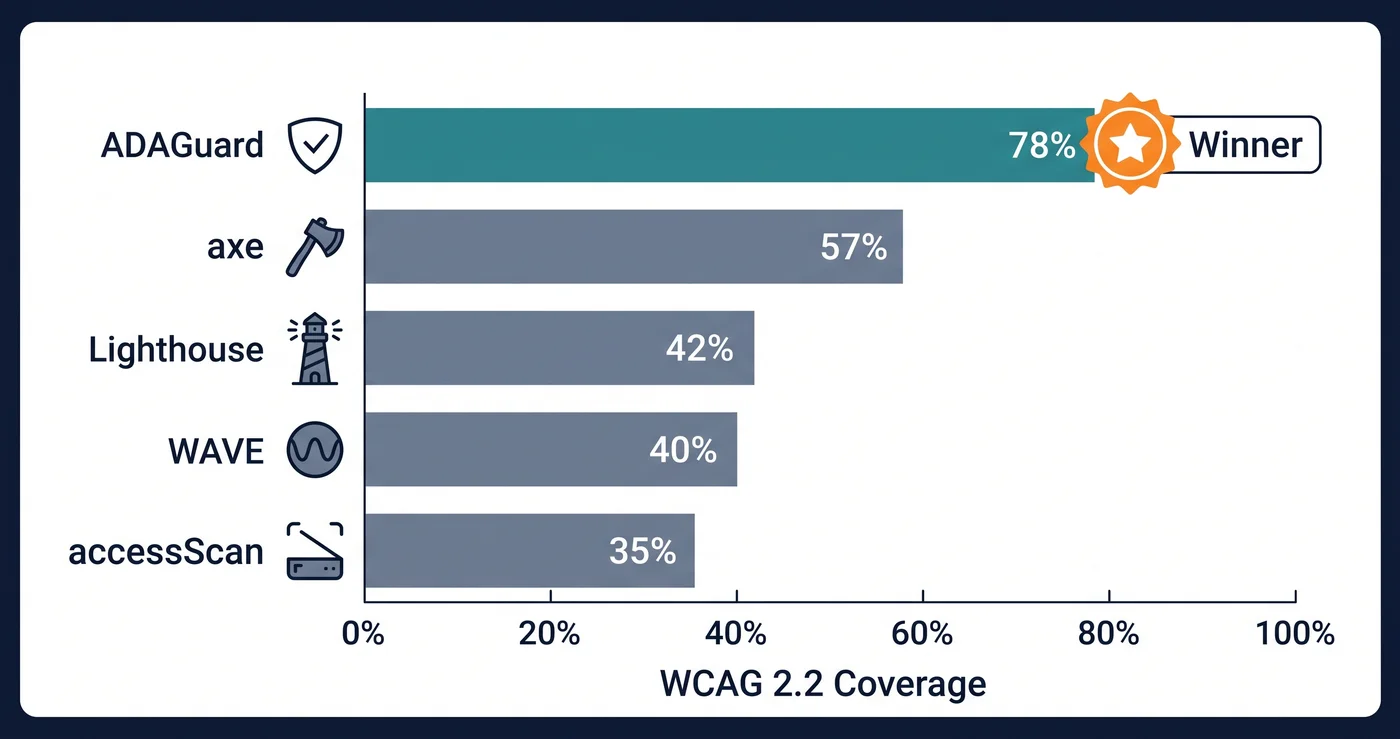
The most important number you'll never see advertised: how much of WCAG does your accessibility tool actually test?
Every tool on this list claims to check ADA compliance. What differs is how much of the WCAG 2.2 AA success criteria each can verify automatically. For the best ada compliance checker you can find, ADAGuard covers around 78% (43 of 55 criteria); most single-engine free tools cover only a subset.
That gap isn't a minor technical detail. It's the difference between finding your accessibility violations before a law firm does and finding them after.
With 4,800+ ADA web accessibility lawsuits filed in 2025 (UsableNet) — a significant year-over-year increase — the practical question isn't whether to use a WCAG compliance checker. It's which one actually finds what you need to find.
How to Evaluate an ADA Compliance Checker
Before comparing tools, here's the framework:
Automated coverage — What percentage of WCAG 2.2 AA success criteria does the tool test automatically, without human review? This is the most important metric and the one most vendors obscure.
WCAG version — Does the tool test WCAG 2.1 or 2.2? Courts and regulators in 2026 increasingly reference 2.2. Nine new criteria in 2.2 are not tested by tools that haven't updated their engines.
DOM rendering — Does the tool scan your live rendered page (including JavaScript), or does it analyze raw HTML? Tools that don't render JavaScript miss dynamic content, lazy-loaded images, and conditional states.
Authenticated scanning — Can the tool scan password-protected pages and logged-in experiences? If your product is behind a login, you need this.
Cost — Does the price scale with users, scans, pages, or a flat fee?
The 5 Major ADA Compliance Checkers Compared
| Tool | WCAG Coverage | WCAG Version | DOM Rendering | Auth Scanning | Starting Cost |
|---|---|---|---|---|---|
| ADAGuard | ~78% | 2.2 AA + AAA | Yes (headless) | Yes | Free (no signup) |
| axe DevTools Pro | Partial — rule-based | 2.1 AA | Browser only | Limited | $45/user/month |
| WAVE | Partial — structural | 2.1 AA | Browser only | No | Free / $4/mo |
| Google Lighthouse | Partial — rule subset | 2.1 AA | CLI only | No | Free |
| Siteimprove | Broad (enterprise suite) | 2.1 AA | Yes (crawler) | Yes | ~$2,300/mo |
ADAGuard's figure is a criterion-by-criterion code audit (full methodology at adaguard.io/wcag-coverage). Other figures are approximate, based on each vendor's own published rule inventory — not independently verified. All tools require some manual testing for complete compliance verification.
Tool-by-Tool Breakdown
ADAGuard (adaguard.io)
ADAGuard is the best ada compliance checker for teams who need broad automated coverage at accessible pricing. It runs 22 custom accessibility checker modules plus axe-core integration, reaching approximately 78% WCAG 2.2 AA automated coverage — the highest in this comparison.
What sets it apart: - Full headless browser rendering — tests your page as users experience it, including JavaScript-rendered content - Color contrast testing in all element states: placeholders, disabled inputs, hover states, error messages - WCAG 2.2 criteria including 2.4.11 (focus appearance) and 2.5.8 (target size) - Bonus AAA checks (2.5.5, 2.3.3, 2.4.13) on every plan including free - Authenticated scanning for password-protected pages and logged-in flows
Pricing: - Free: Scan any URL instantly, no signup - Professional: $129/month — up to 90% lower cost than traditional enterprise platforms like Siteimprove - For teams of 5: $129/month flat vs $45/user/month for axe DevTools Pro
Best for: Small businesses, agencies, e-commerce stores, any team that needs comprehensive automated scanning at non-enterprise pricing.
axe DevTools Pro (Deque)
axe-core is the gold standard open-source accessibility engine. It powers WAVE, Lighthouse, Accessibility Insights, and dozens of other tools. axe DevTools Pro is Deque's commercial product built on that engine, adding browser extensions, IDE integrations, and CI/CD pipeline support.
Automated coverage: ~57% of WCAG 2.1 AA — the highest among tools built purely on the axe engine.
What it does well: Developer workflow integration. axe DevTools works inside VS Code, in your CI/CD pipeline, and in browser DevTools, catching issues earlier in the development cycle before they hit production.
Limitations: Tests WCAG 2.1, not 2.2. No built-in authenticated scanning for app interiors. Pricing scales per user, making it expensive for larger teams.
Pricing: Per-user monthly subscription; enterprise contracts typically $15,000-$50,000/year for small to mid-sized teams.
Best for: Development teams that want accessibility testing integrated into their build pipeline.
WAVE (WebAIM)
WAVE is the most widely used free accessibility checker and an excellent starting point. It provides a visual overlay directly on your page, making it intuitive for non-technical users to understand what's failing and where.
Automated coverage: ~40% of WCAG 2.1 AA. WAVE identifies clear structural errors well — missing alt text, empty form labels, missing document language, heading order violations.
Limitations: Tests WCAG 2.1 only. Cannot test dynamic content, JavaScript-rendered elements, or conditional states. No authenticated scanning. Its visual overlay approach means you test one page at a time.
Pricing: Free browser extension. WAVE API for bulk scanning starts at $4/month.
Best for: Quick spot-checks, visual learners who benefit from overlay interface, and developers running single-page audits.
Google Lighthouse
Lighthouse is Google's open-source audit tool, available in Chrome DevTools and as a CLI. Accessibility is one of five audit categories alongside performance, SEO, best practices, and PWA.
Automated coverage: ~42% of WCAG 2.1 AA. Lighthouse uses a subset of axe-core rules.
Limitations: The Lighthouse accessibility score is frequently misunderstood as a compliance score — it's not. A 100/100 Lighthouse accessibility score means you've passed automated checks for roughly 42% of WCAG 2.1. Courts don't accept Lighthouse scores as compliance evidence.
What it does well: Free, integrated into every developer's workflow, good for catching the most common structural errors quickly.
Best for: Developers who want a quick sanity check during development — not for formal compliance review.
Siteimprove
Siteimprove is an enterprise content intelligence platform with an accessibility module. It's used by large organizations and public sector agencies that need ongoing monitoring across thousands of pages.
Automated coverage: partial WCAG 2.1 AA coverage via Siteimprove's accessibility module (per its own documentation).
Pricing: Approximately $2,300/month (~$28,000/year) for a professional plan — the highest in this comparison by a wide margin. ADAGuard's Professional plan provides comparable or higher automated coverage at $129/month — up to 90% lower cost than traditional enterprise platforms.
Best for: Enterprise organizations with dedicated accessibility teams, compliance officers, and budgets that support the investment.
What No ADA Compliance Checker Can Do Alone
Even the best ada compliance checker in 2026 can't automate everything. The hard ceiling for automated tools is around 78-80% of WCAG criteria — the rest requires human judgment.
What you still need to test manually: - Whether image alt text accurately describes the content (a tool only checks if alt text exists) - Whether your tab order and keyboard flow is logically structured for a user who can't see the page - Whether your ARIA implementation behaves correctly in an actual screen reader session - Whether your content makes cognitive sense for users with cognitive disabilities
The practical approach: run an automated scan first to clear the 78% a good checker can find, then focus manual testing time on the remaining criteria where human judgment is required.
The 30-Second Fix
The fastest way to benchmark your site against the best ada compliance checker standard is a free scan. Paste any URL at adaguard.io — no signup, no credit card. In under 30 seconds you get a compliance score, every violation categorized by WCAG criterion, and the specific element references needed for remediation.
If you're comparing tools, start with the free scan and see how many issues it finds. A tool that finds more violations is giving you more information, not creating more problems — those violations already existed.